How Power BI Delivers Clarity for Executive Decisions

Updated: Sep 3, 2025
Business leaders today face an increasingly complex challenge: making critical decisions while drowning in disconnected data. The proliferation of specialized software tools from CRM systems to accounting platforms to inventory management solutions has created data silos that prevent organizations from seeing the complete picture. Microsoft Power BI represents a solution to this challenge.
The True Cost of Inefficient Data
When your data is scattered across different systems and requires manual assembly, the risk of error increases substantially. It has a direct financial impact that can stunt your company's growth.
Consider a mid-sized manufacturing company with $50 million in annual revenue. The leadership team needs to juggle separate reports from sales, operations, and finance. Each report is a static Excel file which is updated only once a week.
A Common Scenario of Disconnected Data
This situation typically creates several problems. The sales team tracks orders in its CRM. The warehouse team manages stock levels in a separate inventory system. Meanwhile, the finance team monitors procurement spending in its accounting software. To get a complete picture, a business analyst must spend hours manually combining these different files.
This manual process is a source of significant issues:
Delayed Information: By the time a consolidated report reaches the CEO's desk, the data is already days old. A sudden spike in demand for a product goes unnoticed until it is too late to react.
Inaccurate Forecasting: Manual data entry is prone to errors. A single misplaced decimal in a spreadsheet can disrupt an entire inventory forecast.
Poor Team Alignment: The sales team might launch a major promotion, unaware that the warehouse has low stock. The operations team might order more raw materials based on outdated sales figures. Each department makes decisions in isolation.
The real cost of poor data is not just the time spent managing spreadsheets. It is the cost of missed opportunities, inefficient capital allocation, and the slow, reactive decision-making that holds the business back.
Fixing these foundational data problems is a core business necessity. A powerful business intelligence tool like Power BI centralizes scattered information and creates a reliable source of truth. This allows leadership to stop analyzing the past and start proactively shaping the future. Such clarity is fundamental for any company focused on sustained growth.
What Is Power BI and How Does It Help Your Business?
Power BI connects to all your scattered data sources, including your CRM, accounting software, and operational systems, and presents it on one interactive dashboard that is always up to date.
The Core Components of Power BI
To understand what makes Power BI effective, it helps to know its two key parts. They work together to turn raw data into useful business information.
Power Query: This connects to all your different data sources and cleans up the information. It can standardize date formats, remove duplicate entries, or merge information from multiple files. In short, it confirms your data is accurate and reliable before you begin analysis.
Visualisation Engine: Once the data is clean, the visualization engine creates interactive reports and dashboards with a wide range of charts, graphs, and maps.
Power Query saves countless hours of manual work and eliminates the human error that occurs during manual data consolidation. The visualization engine makes complex data simple enough for even non-technical leaders to understand at a glance.
How Power BI Drives Performance Across Your Business
When every department has access to reliable information, the entire organization moves with more speed. This is where Power BI excels.
The value of Power BI becomes clear when you see it in action within different business units. From sales to operations and finance, it gives teams the clarity to spot problems early and act with confidence.
Giving Sales Teams a Live Pulse on Performance
For any sales team, staying on top of quotas and pipeline health is critical. Sales managers need to see what is happening as it happens. Consider a software company with 20 account executives. Their main challenge is tracking each person's performance against quarterly targets and determining if the sales pipeline is healthy. The sales director spends hours combining data from the CRM and finance systems just to get a basic overview.
A Power BI dashboard changes this process completely. It can:
Track Quotas in Real Time: By connecting directly to the CRM, it shows every representative's progress towards their quota, updated instantly.
Visualize the Sales Funnel: The dashboard can map out the entire pipeline. It shows conversion rates at each stage and flags exactly where deals are getting stuck.
Analyze Sales Cycles: It can calculate the average time to close a deal, which helps managers forecast more accurately and coach their teams more effectively.
The sales team becomes proactive, not reactive. Every conversation is backed by hard data.
To learn more about how we can help with sales analytics, check out our data insights here.
Bringing Project Clarity to Streamline Operations
In fields like construction, managing a project is a high-stakes balancing act. A single project can have hundreds of moving parts, such as budgets, materials, and labor schedules. A small delay can create a significant ripple effect if not caught immediately.
Picture a construction firm juggling multiple commercial building projects. The operations manager struggles to get a clear view of project health. The information is scattered everywhere: in project management software, accounting systems, and supplier invoices.
Power BI acts as a central command center for operations that builds a detailed report that:
Monitors Budgets vs. Actuals: It pulls all financial data together to show exactly where each project stands against its budget in real time.
Tracks Project Timelines: The report can visualize key milestones and instantly flag any part of the project that is falling behind schedule.
Highlights Resource Allocation: It offers a clear view of labor hours and material usage, helping to prevent shortages or overspending.
This visibility allows the operations team to shift from constantly fighting fires to proactively managing projects. They can spot potential budget problems early, move resources where needed, and keep everything on track, directly protecting the company's profit margins. For more on this, check out how GrowthBI helps with streamlining construction operations here.
Providing Financial Insight for Smarter Strategy
The finance department is the backbone of any business. For a CEO or CFO, having a clear view of the company’s financial health is non-negotiable.
Take a mid-sized manufacturing company, for example. It needs to manage its working capital with precision. The finance team must keep a close eye on accounts receivable, accounts payable, and cash reserves to make smart decisions about investments and expenses.
A Power BI dashboard delivers this crucial oversight by:
Consolidating Cash Flow: It connects to banking, accounting, and invoicing systems to create a single view of cash flow.
Analyzing Debtor Days: The dashboard can automatically calculate the average time it takes to get paid which highlights any trends that need attention.
Forecasting Financial Scenarios: It allows the finance team to model different situations, such as the impact of a large upcoming expense on cash reserves.
Power BI's ability to integrate with so many different data sources makes it very powerful. To learn more about how we help bring clarity to your cash flow, risk, revenue, and operational metrics, check out GrowthBI's financial services.
This chart gives you an idea of its built-in connectors and their focus. The large number of cloud connectors shows how well Power BI integrates with modern software tools which makes it much easier to incorporate into the technology you already use.
To put this all into perspective, here is a look at how different departments can use Power BI to solve everyday business problems.
Power BI Applications Across Industries
Industry | Business Problem | Power BI Solution |
SaaS | Unclear customer churn patterns and difficulty tracking subscription metrics across multiple platforms | Unified dashboard consolidating subscription data, usage analytics, and customer health scores to predict churn risk |
Health Care & Fitness | Fragmented patient data across multiple systems making it difficult to track outcomes and optimize care delivery | Integrated dashboard combining patient records, treatment outcomes, and operational metrics for comprehensive care management |
E-commerce | Scattered sales data across multiple channels with no unified view of customer behavior and inventory performance | Centralized dashboard tracking sales performance, customer lifetime value, and inventory levels across all channels |
Construction | Project cost overruns and delays due to lack of real-time visibility into budgets, timelines, and resource allocation | Real-time project dashboard monitoring budgets vs. actuals, timeline milestones, and resource utilization across all projects |
Manufacturing | Inefficient production planning caused by disconnected data from shop floor, inventory, and demand forecasting | Integrated production dashboard combining real-time machine data, inventory levels, and demand forecasts |
Financial Services | Fragmented client data making it difficult to assess risk profiles and identify cross-selling opportunities | Comprehensive client dashboard consolidating transaction history, risk assessments, and portfolio performance |
Education | Scattered student performance data across multiple systems hindering academic support and resource allocation | Unified student analytics dashboard tracking academic performance, attendance, and engagement metrics |
Supply Chain | Limited visibility into supplier performance and inventory levels across multiple locations and partners | End-to-end supply chain dashboard monitoring supplier metrics, inventory levels, and delivery performance |
In one such use case, this dashboard visual highlights stock urgency across plants by projecting inventory levels against past-due and upcoming orders. It flags materials at risk of shortage within 7–14 days, helping teams quickly identify “urgent” SKUs and take timely action to avoid stockouts.

As you can see, the applications are practical and deliver tangible results. Businesses are increasingly adopting tools like Power BI because they recognize the need for greater transparency in their operations. Industries from healthcare to retail are using business intelligence to manage resources better and become more agile. This widespread use across key sectors highlights the significant impact Power BI is having on our national business landscape.
Integrating Power BI with Your Existing Technology
Rolling out new software can feel like a major disruption, especially when teams are already comfortable with their current systems. This is an area where Power BI stands out. It is built to integrate with your current system that acts as a powerful reporting layer on top of your existing software.
Connecting to Your Core Business Systems
Power BI comes with a large library of native connectors. These are pre-built, secure bridges that link Power BI to hundreds of the most common business applications.
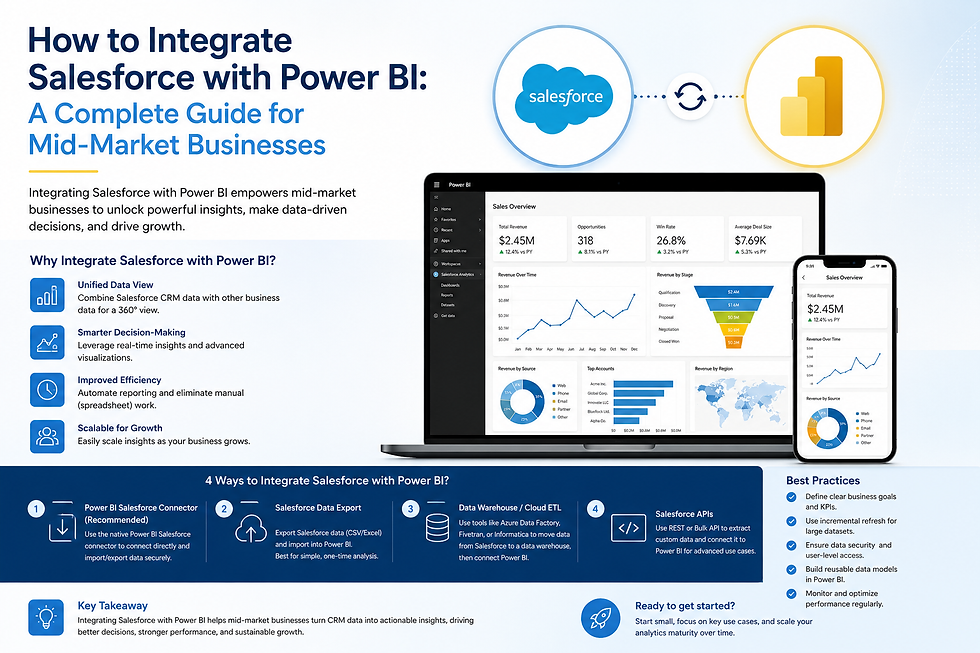
For a SaaS company, they could link Power BI directly to their Salesforce CRM to get a live pulse on their sales pipeline. At the same time, it can pull financial data from Xero or MYOB and retrieve subscription numbers from their own SQL database.
Common connections for growing businesses include:
CRM Systems: Pull real-time data from platforms like Salesforce and Dynamics 365 to track sales wins, customer acquisition costs, and pipeline health.
Accounting Software: Link with tools like Xero, QuickBooks, and MYOB to monitor cash flow, check expenses against budgets, and analyze profitability.
Databases and Warehouses: Connect directly to SQL Server, Azure SQL Database, and other data storage systems to tap into deep operational data.
Adapting to Your Company's Data Maturity
Not all of your data resides in advanced cloud platforms. We know many growing companies still depend on spreadsheets, especially Microsoft Excel, for specific tasks or important tracking. Power BI is designed for this reality.
You can easily connect Power BI to individual Excel workbooks or even entire folders of them in SharePoint or OneDrive. This is a significant benefit for businesses just beginning their data modernization, or for specific departments like finance that rely on spreadsheets for planning and analysis.
Power BI meets you where you are. Whether your data is in an advanced cloud warehouse or a collection of organized spreadsheets, the platform can centralize it for consistent, reliable reporting.
For example, a construction firm could combine project updates from its main management software with budget forecasts managed in Excel. A manufacturing business might link its ERP system data with quality control logs kept in separate files.
This adaptability makes Power BI a practical choice regardless of your company's digital maturity. By acting as a flexible and powerful central hub, Power BI helps you create a single data ecosystem that powers smarter, faster decisions across the board.
Building a Data-Driven Culture with Power BI
Implementing Power BI is a technical project, but its adoption across the business is about people and culture. An excellent dashboard is useless if your teams do not feel confident to use it. As a leader, your role is to guide this change.
This kind of change does not happen on its own. It requires a clear plan and, most importantly, visible support from the top. When executives start using dashboards in meetings and base their arguments on data everyone can see, it sends a powerful signal. The rest of the company will notice and follow.
Start Small to Win Big
One of the most common mistakes is trying to roll out Power BI to everyone at once. A more effective approach is to select a single, high-impact pilot project. Find one specific, persistent problem in the business and focus all your energy on solving it first with Power BI.
This "start small" approach works well because it:
Creates early wins: A successful pilot gets people excited and creates internal advocates for the new way of working.
Minimizes risk: You can resolve any issues on a small scale before a wider implementation.
Proves the concept: It shows teams firsthand how better data leads to better results.
Once that first project is a success, you have a powerful case study to share throughout the organization. It makes every subsequent rollout smoother because you are not just selling a concept; you have proof it works.
When people see for themselves that data helps them solve real problems and do their jobs better, they will start seeking it out on their own.
From Data Access to Data Literacy
Providing teams with a dashboard is only the first step. The next, more important step is to build data literacy. This means empowering your people to ask intelligent questions of the data, challenge what they see, and use it to support their ideas.
Encourage your managers to make dashboards the starting point for team discussions. Instead of asking, "What is your gut feeling on this?", they should be asking, "What is the data telling us?". This simple change shifts conversations away from opinion and towards evidence. It builds a culture of curiosity, where people feel safe to explore the numbers and ask "why?".
At the end of the day, Power BI is most effective when used as a tool for empowerment. Automating reports frees your team from the tedious work of compiling numbers. You can read more about the real business benefits of automated reporting in our detailed guide. By championing this shift, you create an environment where data becomes a shared asset that drives focus, clarity, and confident decisions across the entire company.
At GrowthBI, we specialize in building the exact data foundations and Power BI dashboards that give leadership teams the clarity they need to make faster, smarter decisions. We handle the technical complexities so you can focus on running your business.